Dr W Kuan Hon and Dr Eoin Woods highlight the ongoing data protection issues caused by not using BCC and suggest some technical solutions.
Introduction
Sending bulk emails with recipients listed in the TO or CC fields rather than using Blind Carbon Copy (BCC) is a commonly occurring data security incident, with over 2,000 such incidents reported to the UK Information Commissioner’s Office between 2019 and 2025. Under the EU and UK GDPR, such incidents can constitute reportable personal data breaches, exposing organisations to regulatory fines and reputational damage, with potentially serious harm to individuals where sensitive data such as health information is involved. Despite staff training and policy guidance, human error makes this an enduring risk.
This paper examines available technical mitigations, argues the case for a purpose-built Outlook add-in that warns users when sending to large numbers of external recipients, and presents an outline design for such an add-in. We further note that, for sensitive communications, regulators recommend mail merge or dedicated bulk email services as more robust alternatives to policy-based BCC enforcement.
The Problem with Emails and Data Privacy
Many organisations’ staff sometimes send emails showing all recipients’ addresses in the TO or CC (carbon copy) fields instead of using BCC (blind carbon copy), resulting in inadvertent data security breaches through staff’s unawareness of laws and policies affecting email addressing, or simply human error. We therefore suggest that organisations should consider using an Outlook add-in specifically designed to address this problem, which should, ideally:
- display a warning dialog if an email user tries to send an email with more than a predefined number of email recipients in the TO and/or CC fields,
- enable administrators to configure the maximum number of recipients and define a set of organisational domain names or related domain names (like C.com, C.co.uk) which should be ignored so that only external email addresses are counted,[1]
- allow individual users to reduce the number of recipients that triggers the warning as a personal setting, but not to increase it; and
- offer to move the email addresses from TO/CC to the BCC field with one click, inserting the sender’s own email address in the TO field instead, requiring user action before the email can be sent.
Under the EU/UK General Data Protection Regulation (GDPR), many fines/reprimands and attendant negative publicity, with reputational implications for organisations, have resulted from staff inadvertently sending recipients bulk emails using TO or CC, when they should have used BCC. Several concrete examples arelisted in this accompanying table.
Often, organisations do issue policies or other guidance and train and regularly remind their staff to use BCC, not TO/CC. However, even the best-trained, best-intentioned people can have a bad day, and just forget the guidance and make this common mistake. Inevitably, but realistically, human error will always be a risk in practice.
The Regulatory Position
By way of background, under the EU GDPR and UK GDPR:
- there is a core security principle requiring “controllers”, who control the purposes and means (why and how) of processing personal data, to process personal data in a manner that ensures appropriate security of the personal data, including protection against unauthorised or unlawful processing and against accidental loss, destruction or damage, using appropriate technical or organisational measures: known as the “integrity and confidentiality” principle (Art.5(1)(f), higher-tier fine[2] possible on the controller), and/or
- “appropriate” security measures must be taken by both controllers and any processors engaged to process personal data for a controller (Art.32, lower-tier fine possible on the controller and/or processor – and yes, integrity and confidentiality breaches are a subset of security breaches, so there is some overlap), and
- controllers may, with some exceptions, have to report personal data breaches (PDBs) to GDPR regulators/supervisory authorities within 72 hours, and in some cases may also have to notify the affected individuals (data subjects).[3]
Sending emails to many recipients externally using TO/CC instead of BCC is likely to constitute a security breach and personal data breach (unless only business addresses of limited companies were involved), because:
- This will reveal to all recipients the email addresses of other recipients, i.e. data subjects if they are individuals: people’s email addresses are considered their personal data, while a generic email address like info@[company].com alone would not constitute personal data;
- This could reveal to all recipients some other recipients’ personal data, if they are individuals and their email address and/or label included identifying information like their first name/initials and surname (e.g. firstname.surname@[company].com), and
- Sometimes, not using BCC may also reveal to recipients other information about all recipients, because of the nature or content of the email and/or the sending organisation. This information can include sensitive data like “special category data” under GDPR (health data, sex life/orientation, political opinion, religious/philosophical beliefs, genetic data, biometric data for the purpose of uniquely identifying someone, or trade union membership[4]) – such as recipients’ HIV status, if the email body/content shows it was intended for people living with HIV.
EU data protection regulators collectively, in the form of the European Data Protection Board (EDPB), have stated in Guidelines 01/2021 on Examples regarding Personal Data Breach Notification, “Advisable: When sending e-mails to multiple recipients, they are listed in the ’bcc’ field by default. Extra confirmation is required when sending e-mails to multiple recipients, and they are not listed in the ’bcc’ field”, and in Guidelines 9/2022 on personal data breach notification under GDPR, “Examples of personal data breaches and who to notify include: A direct marketing e-mail is sent to recipients in the “to:” or “cc:” fields, thereby enabling each recipient to see the email address of other recipients.”
The UK data protection regulator, the Information Commissioner’s Office (ICO, to become the Information Commission), specifically includes failure to use BCC as a specific incident type in its published data on security incidents trends (from which the screenshot, in Figure 1 below, is taken). From that data as at March 2026, ~2392 incidents for failure to use BCC were reported to the ICO between 2019 and 2025.[5]
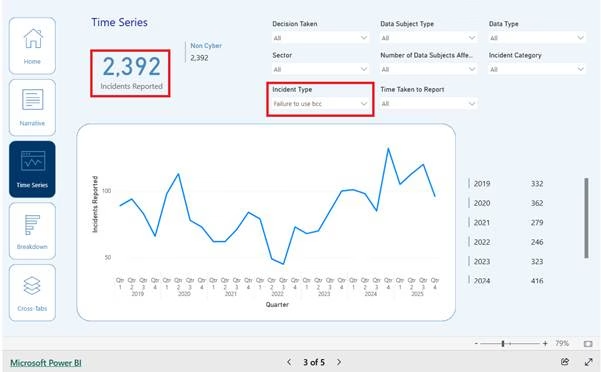
Figure 1: Statistics on the “Failure to use bcc” incident type from the UK ICO
Not using BCC can infringe other GDPR requirements besides security. Controllers must have a recognised legal basis under Art.6 GDPR, like “legitimate interests” or consent, to process personal data. “Processing” can include exposing people’s personal data (like email addresses/names) to others by sending emails without using BCC. So, emailing multiple recipients without using BCC may lack a legal basis. To process special category data, an additional recognised basis is needed (Art.9 GDPR). Furthermore, revealing email addresses in bulk emails could infringe other core GDPR principles (like purpose limitation)[6] or other requirements e.g. for “data protection by design and by default” (DPbDD) under Art.25 GDPR.
Frustratingly, failure to enforce BCC isn’t a new problem (see the pre-GDPR fines listed on the table published to accompany this article). Nor are solutions particularly difficult technically, or even novel. As long ago as 2012, the London Borough of Newham had designed controls, including an Outlook BCC warning initiative. In 2013, the ICO had recommended using BCC when emailing volunteers, in an audit and more generally. And, a 2015 Big Brother Watch report listed (in Table 3) many incidents of UK local authorities/councils emailing multiple recipients using TO instead of BCC.
Possible Technical Solutions
In Microsoft 365 (M365, formerly “Office 365”), administrators can use a mechanism called MailTips to provide a limited warning, which can be triggered for specific recipients (e.g. distribution lists, email addresses, M365 users), or based on conditions like “Large Audience”, which is set on an organisation-wide basis as a config parameter (over 25 recipients by default). MailTips appear in a grey bar above the “To:” field in Outlook clients, see the screenshot below, estimating the number of recipients:

However, MailTips have significant limitations:
- Very easy to miss or ignore.
- Users can’t be forced to acknowledge the message, it just appears silently and doesn’t interrupt users’ workflow.
- Users must be online, connected to the Exchange server, for MailTips to appear (the server, not the client, conducts the evaluation).
- Users can choose to disable the feature entirely.
- Only 175 characters are displayable.
- MailTips are only available in Outlook for Web, Outlook for Windows 2010 and later and the iOS and Android Outlook clients. Notably, they are not available in Outlook for Mac clients.
As a result of these limitations, we suggest that an Outlook email “add-in” is preferable. Outlook email add-ins are built using the Microsoft Office Add-ins library and tools which allows extensions to Outlook to be created using web technologies, notably JavaScript (or TypeScript), rather than traditional Microsoft application development languages like C# or C++.
For security and stability reasons, Outlook add-ins run in a sandboxed environment and communicate with Outlook through the Office JavaScript API. The appendix below contains a technical discussion, including possible JavaScript pseudo-code for the main part of such an add-in, which can be used to lead a discussion with IT teams to suggest how they could approach implementing this kind of add-in, alongside the rest of this article illustrating to such teams the risks of simply relying on humans to always follow any policies on BCC and to never make any mistakes!
Regulatory Guidance
While many fines have been low or not even imposed because, e.g., the controller had improved their practices, the consequences of not using BCC can be serious particularly when involving health data, as certain examples in our table show. Furthermore, while it is important, as a minimum, for organisations to ensure that staff use BCC when sending mass emails externally (e.g. by implementing an add-in as we suggest, which should help avoid breaches in many cases), we should point out that enforcing BCC alone is not always sufficient, particularly with sensitive data. Organisations need to evaluate the risks to personal data on a case-by-case basis, and implement security measures appropriate to those risks. In 2023, the ICO published new guidance on sending bulk communications by email (BMJ article), noting that:
“Failure to use BCC correctly in emails is one of the top data breaches reported to us every year – and these breaches can cause real harm, especially where sensitive personal information is involved.
“While BCC can be a useful function, it’s not enough on its own to properly protect people’s personal information. We’re asking organisations to assess the nature of the information and the potential security risks when deciding on the best method to communicate with staff or customers. If organisations are sending any sensitive personal information electronically, they should use alternatives to BCC, such as bulk email services, mail merge, or secure data transfer services.”[7]
So, in fact, the ICO recommends generally not using BCC for bulk email where the email content is particularly sensitive: “If organisations are sending any sensitive personal information electronically, or are contacting individuals regarding health-related matters, they should use alternatives to BCC, such as bulk email services, mail merge, or secure data transfer services”: see its Email and security guidance, which states (emphasis added):
- “Even if email content doesn’t have anything sensitive in it, showing which people receive an email could disclose sensitive or confidential information about them.
- You must assess what technical and organisational security measures are appropriate to protect personal information when sending bulk emails (emails that you send to multiple recipients).
- You should train staff about security measures when sending bulk communications by email.
- You should include in your assessment consideration of whether using secure methods, such as bulk email services or mail merge services, is more appropriate, rather than just relying on a process that uses Blind Carbon Copy (BCC). This helps ensure you are not sharing personal information with other people by mistake.
- If you are only sending an email to a small number of recipients, you could consider sending each one separately, rather than one bulk email.
Note: In this guidance, sensitive information may include, but is not limited to, special category information. Whether information is sensitive can depend on the context and you should consider what impact it would have on people if there was a breach. For example, financial information or information that might be used to commit ID fraud would be sensitive information for these purposes. Even if email content doesn’t have anything sensitive in it, showing which people receive an email could disclose sensitive or confidential information about them.”
The ICO’s guide for SMEs on BCC again suggests using bulk email or mail merge services, further linking to support on using mail merge from Microsoft (365) and Google (Gmail). In addition, it mentions as possible measures setting rules to provide alerts when senders use CC, or setting a delay before sending to allow time for error correction.
An ICO representative also said, “It’s one that can – at very low cost by just using mail merge, rather than BCC – be engineered out. That capability is included in the main email packages… so, that is one that we hope soon to see disappear. Because it is avoidable, and the consequences can be quite horrific.”
However, we point out that, contrary to the ICO’s comments, currently it does not seem technically possible to create Outlook rules alerting when senders use CC even for admins. Also, mail merge is not included in many email packages (although e.g. Google Workspace and Firefox have it), and even where included, as with Outlook, it is typically very cumbersome to use: that is why many people don’t use it.[8] But it is possible to include a delay before sending.
Concluding remarks
In summary, organisations should consider following the regulatory recommendation to adopt mail merge or bulk emailing services instead of relying on staff to remember to use BCC, especially if the organisation handles sensitive personal information. But, also, it seems sensible to implement a send delay and deploy generally, across the board, the type of add-in we suggest, at least when staff send emails to multiple recipients externally, given the relatively low costs of implementation compared with the legal and reputational risks of staff failing to use BCC.
It may also behove organisations to lobby Microsoft to include functionality as per the suggested add-in natively in M365 mail clients, as it would not be technically difficult for Microsoft, and indeed would be a selling point for it. Similarly, implementing much easier ways for organisations to use mail merge would not go amiss! Other providers of email services, whether stand-alone or as part of an office suite like Google Workspace, could gain competitive advantage by offering customers this kind of TO/CC warning functionality.
Appendix: Outlook add-in – technical discussion
The usual approach for creating an Outlook add-in is to identify application events that you want to trigger the add-in, register event handlers for those events, and, in the event handler, access the current application context via an object model and references to objects passed into the event handler. The event handler can modify the environment and return values indicating that the event should proceed or be cancelled.
A lot of information is available about the tools to use, code conventions, add-in configuration, differences between Outlook versions, and mechanisms for deploying an add-in, which a developer needs to be aware of and master. In the interests of brevity and clarity, we ignore those details here and refer the interested reader to the relevant Microsoft M365 documentation.
For our purposes, we need an add-in that will be called when an email is about to be sent, that can retrieve the TO and CC recipient lists for the email, check their lengths (i.e. number of recipients), and, if they are found to be too long, display a warning to the user, requesting confirmation before message dispatch.
The JavaScript pseudo-code for the main part of such an add-in might look like this, where config.recipientThreshold is the maximum number of total recipients over which the warning would be triggered:

At that point this code retrieves its configuration settings, extracts the recipients from the email structure, filters the recipients for external email addresses, and checks how many there are.
In this code we have omitted quite a lot of detail, but in essence, we have declared an event handler which we would bind to the OnMessageSend event so that this code is called when a user clicks the “Send” button.
If there are more external recipients than the threshold allows, the event handler returns a status value to the runtime i.e. running mail application, indicating that the send event should be blocked and providing a message to display to the user, along with an Outlook-specific flag to indicate that the user should be prompted whether to override this decision or not.
Further enhancements are possible, most notably handling email lists. This code treats an email list address as a single recipient and we would need to extend it significantly to expand email lists, to allow their content to be checked, but this is something that is possible to add if required.


Dr Eoin Woods, Artechra, London
[1] A security breach could be possible where an email is sent only to internal recipients if it is sent to unintended internal recipients, but that is a separate matter from sending an email to external recipients that reveal their email addresses to each other.
[2] Generally, Art.83 GDPR provides for 2 possible tiers of fines, a.k.a. monetary penalties, depending on the rule infringed: up to the higher of €10m and 2% turnover (which can be a corporate group’s total turnover, not just one subsidiary’s), or up to the higher of €20m and 4% turnover.
[3] Processors also have to report PDBs to their affected controllers (Art.33(2) GDPR).
[4] Note that financial data is not considered “special category”.
[5] Regarding the screenshot’s “Non Cyber” reference, although emails are sent using technology, the ICO considers failure to use BCC to be “non-cyber”.
[6] While, contrariwise, using BCC ties in with the data minimisation principle, as a Belgian regulator noted.
[7] Using such third-party services carry their own risks, so it is crucial to ensure appropriate due diligence and agreements with the third parties, including GDPR-compliant agreements where service providers are processors (or even controllers): discussion out of scope for current purposes.